Getting an Eki-net Receipt Is Easy at the Ticket Machine
This page is an English translation of the original Japanese article. Some screenshots, instructions, and messages related to Eki-net are translated from their Japanese versions and may differ from the official English wording used by JR East.
This article explains how to print a receipt for tickets reserved or purchased through Eki-net, JR East's online reservation service. Although making reservations on the Eki-net website is simple, many users are unsure how to issue a receipt. This page walks through the process of printing a receipt at an Eki-net compatible ticket machine, using real examples and photos taken at JR Sendai Station.
Because my business trips had always been irregular, I had never used Eki-net, the JR East online service for reserving and purchasing train tickets and Shinkansen express tickets in advance. However, I recently decided to plan my travel more efficiently, make better use of my time, and even reduce expenses where possible. So I started using Eki-net to purchase my tickets.
Making reservations and purchasing tickets on the Eki-net website was simple, but I wasn't sure how to print a receipt for my Eki-net purchases. After doing some research, I learned that receipts can be issued at certain JR East station ticket machines equipped with Eki-net-compatible terminals. When I tried it, I found that printing a receipt was surprisingly easy.
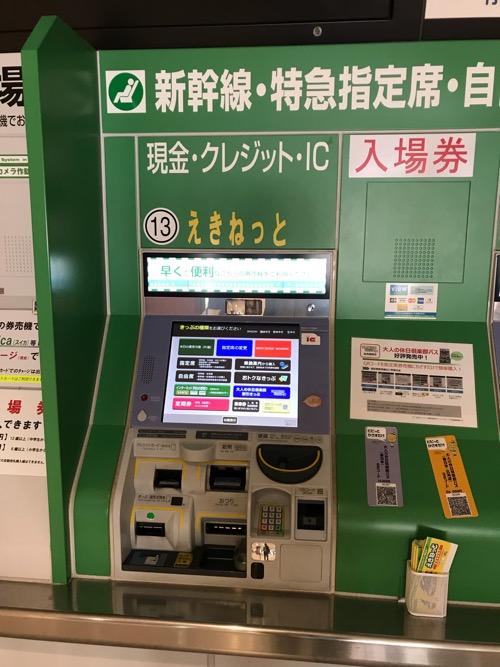
A ticket machine compatible with Eki-net, located on the second floor of JR Sendai Station.
On the screen of this ticket machine, tap the button labeled "Pick up Internet Reservations",
then insert the credit card you used when making your reservation on Eki-net.
The machine will retrieve your reservation information and verify it.
(Important note: If you do not have the credit card used at the time of reservation,
you will not be able to pick up your tickets from the ticket machine.)
Once your Eki-net reservation appears on the screen, the machine will ask whether you want to issue your train ticket or Shinkansen express ticket. Proceed with issuing the ticket. During this process, the machine will also ask whether you want to print a receipt. If you need one, simply press the receipt button displayed on the screen.
As described above, printing a receipt through Eki-net is extremely easy.
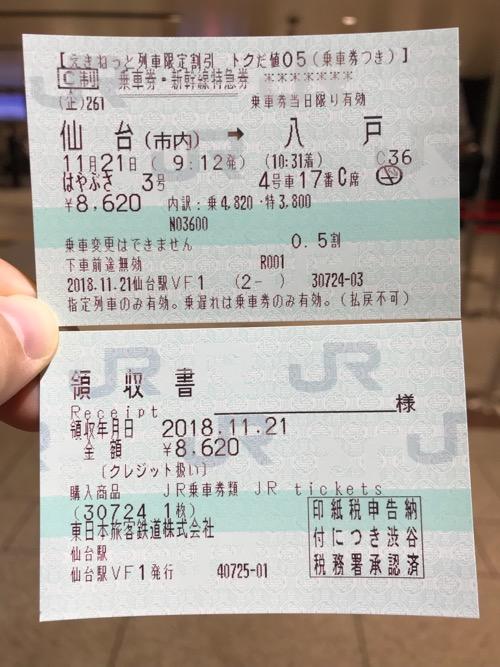
Train ticket, Shinkansen express ticket, and receipt issued from an Eki-net compatible ticket machine at JR Sendai Station.
Because receipts can be printed directly from the ticket machine--without waiting in line at a busy ticket counter-- even busy business travelers who are always pressed for time can use the service with confidence.
By the way, the fare I paid when reserving and purchasing through Eki-net was 8,620 yen. Compared to the regular fare of 9,080 yen, using Eki-net saved me 460 yen.
Since Eki-net makes JR East travel a little cheaper and much more convenient, I plan to keep using it from now on.